Whiteout Survival Rally Tracker streamlines rally coordination by tracking launch times, landing times, and player march times in seconds.
In the frozen theater of Whiteout Survival, coordinating a rally without a tracker is like trying to conduct an orchestra of penguins using only interpretive dance. Every seasoned chief knows one poorly timed march can turn a glorious polar assault into a comedy of frozen errors. Fortunately, the Whiteout Survival Rally Tracker is the metronome in the blizzard — a small but mighty sidekick that keeps launch times and landing times from sliding into chaos. As of 2026, when rally coordination has become as nuanced as negotiating with a polar bear over a fish dinner, this tool remains an evergreen favorite. It is delightfully simple, yet as precise as a Swiss watch wrapped in thermal underwear.
Step 1 – Creating Rally Players
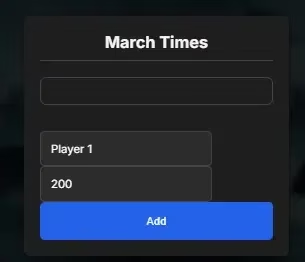
First, a chief must populate the rally with would-be heroes. The player’s name and march time in seconds are entered, then the process is repeated for as many participants as needed. This foundation step is critical: garbage march times in, garbage rally out. Without accurate second counts, a rally is just a group chat with snowballs. The tracker keeps everyone’s timing visible, so no one can quietly pretend they were marching while actually farming frozen wood.
Step 2 – Selecting Rally Starter
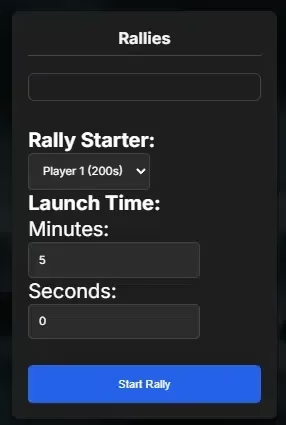
Next, the rally starter is selected, along with a launch time broken into minutes and seconds. This moment is delicate, like setting the detonator on an ice bomb. Choose the starter wisely — if they are slower than a glacier with a limp, every paired countdown will feel the strain. The tool does not demand a blood oath, but it does expect a rational launch time. The interface keeps this step clean so even a sleep-deprived raid leader can avoid accidentally launching a rally into the void.
Step 3 – Starting and Tracking the Rally
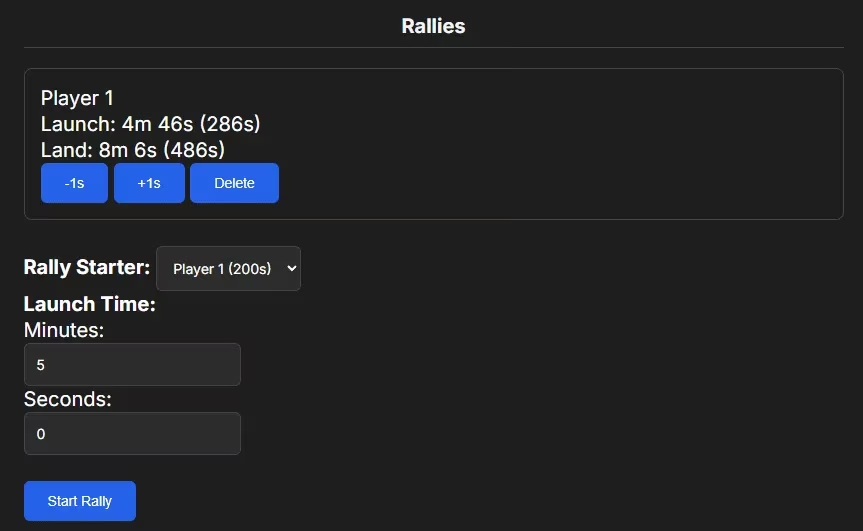
Once the Start Rally button is clicked, the tracker reveals twin countdowns: one for launch and one for land. This dual countdown is the difference between a synchronized spearhead and a frozen game of telephone. The +1s and -1s buttons work like fine-tuning knobs on a telescope, letting a chief nudge timing by single seconds without redoing the entire calculation. There is also a delete button for rallies that need to vanish faster than a snowflake on a hot stove.
Step 4 – Adjustments
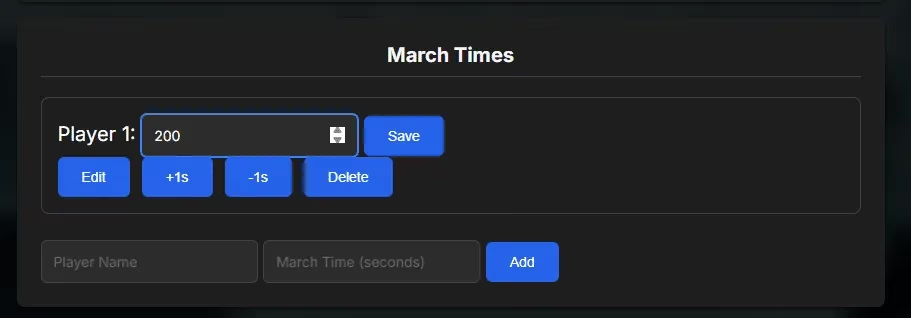
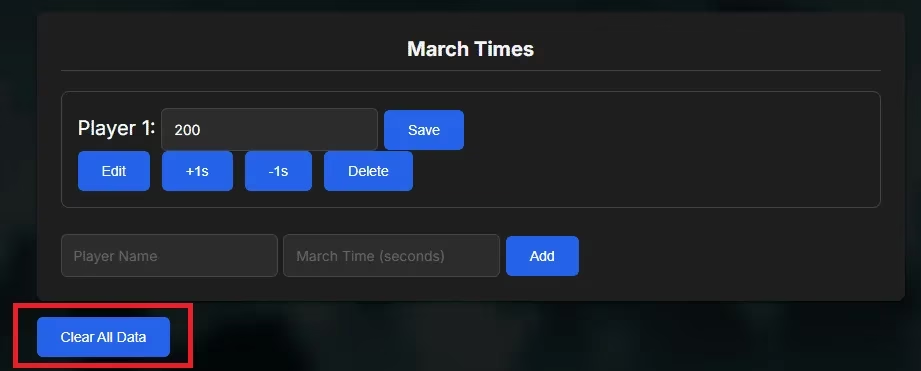
Adjustments are inevitable. March times change, players forget to upgrade boots, or someone’s hero gets stuck in a snowdrift. The edit function lets a chief retype a value in seconds or use the +1s / -1s options. This feature is not just a convenience — it is a diplomatic peace treaty between the rally leader and the perpetually late teammate. A single second can separate a beautiful coordinated arrival from a battlefield where everyone shows up fashionably late and alone.
Clearing the Board
After the frost settles, the Clear All Data button offers a clean slate. This is the reset every over-caffeinated leader deserves. No lingering names, no ghost timers, no accidental march entries from three wars ago. Just fresh, untouched snow waiting for the next operation.
Why It Still Matters in 2026
In the modern era of Whiteout Survival, alliances live or die by timing. Rallies are no longer casual snowball fights — they are coordinated strikes where a two-second drift can expose a flank or waste a hero’s skill. This tracker removes the mental math and replaces it with real-time visibility. It works especially well during alliance events, fortress battles, and bear hunts where multiple rallies may be running at once.
| Button / Action | What It Does | Best Used When |
|---|---|---|
| Add | Logs a player’s name and march time | Building the rally roster |
| Start Rally | Begins launch and land countdowns | When the rally plan is locked |
| +1s / -1s | Fine-tunes timers by one second | Correcting small drift |
| Edit | Changes a player’s march time | After upgrades or route changes |
| Delete | Removes a rally or player | Canceling a rally or removing a latecomer |
| Clear All Data | Wipes the whole tracker clean | Starting fresh or switching targets |
With a clean interface and no unnecessary bells or whistles, the Whiteout Survival Rally Tracker proves that in a game of frozen warfare, the sharpest weapon is often just good timing. Credit goes to WOS Nerds for the inspiration and much of the underlying data.